What NN-tab does
Every new tab opens to the same quiet page: the time, your favourite sites, a short to-do list and a quote you like. No news, no ads, no clutter.

Add it to Chrome in two minutes
It isn’t in the Chrome Web Store yet, so you add it yourself. It only takes a few clicks.
-
Download it
Click the download button. You get one file, NN-tab.zip.
-
Unzip it
Right-click the file, choose Extract All, then Extract. You get a folder called NN-tab.
Keep this folder. Move it somewhere it can stay, like your Documents folder. Chrome uses it every time it opens, so deleting it removes NN-tab.
-
Open Chrome’s extensions page
Type chrome://extensions in the address bar and press Enter. Switch on Developer mode at the top right.
Developer mode only lets you add extensions from a folder on your computer. Nothing else changes.
-
Add NN-tab
Click Load unpacked and choose the NN-tab folder. NN-tab appears in the list, switched on and ready.
Using Edge or Brave? It works there too: type edge://extensions or brave://extensions instead. In Edge, Developer mode is in the menu on the left.
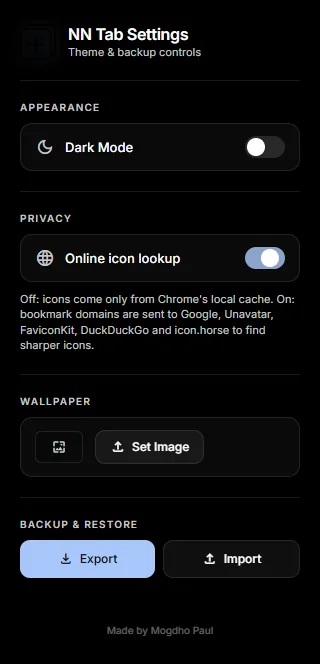
Settings and backup
Click the NN-tab icon in Chrome’s toolbar. If you can’t see it, click the puzzle-piece icon at the top right and pin NN-tab.
Private by default
Your bookmarks, notes and settings stay on your computer. There’s no account, no tracking and nothing to sign up for.
Updating or removing it
Get NN-tab
Free, for Chrome, Edge and Brave.
Download NN-tabMade by Mogdho Paul. Curious how it works? See it on GitHub.